A WordPress CRM can give a small business one place to manage contacts, leads, deals, sales activity, and follow-up without sending every customer record to a separate SaaS platform. The right setup should be simple enough for a small team to maintain, but structured enough to make the sales pipeline visible.
Quick answer: Start with contacts, companies, deals, and a small set of pipeline stages. Assign ownership, capture leads from your website, record notes and activity, and define a clear handoff when a deal is won. Keep permissions tight and avoid adding CRM fields your team will never use.

GrowthCRM: A Self-Hosted WordPress CRM
Self-hosted CRM with pipeline, lead scoring & tracking for WordPress. Read the technical documentation →
What does a small business need from a WordPress CRM?
A small business rarely needs the most complex CRM on the market. It needs a system people will actually update. That usually means a clear contact record, a visible sales pipeline, deal ownership, notes, lead capture, and basic reporting.
| CRM element | What it should answer | Why it matters |
|---|---|---|
| Contact record | Who is this person or company? | Keeps core relationship data together |
| Deal | What opportunity are we trying to close? | Separates a contact from a specific sales opportunity |
| Pipeline stage | Where is the opportunity now? | Makes next actions and bottlenecks visible |
| Owner | Who is responsible for follow-up? | Prevents leads from becoming orphaned |
| Activity and notes | What happened and what is next? | Preserves context across the team |
How should you structure the sales pipeline?
Keep the first version of the pipeline deliberately simple. Too many stages create administrative work without improving visibility. A small business can begin with a structure such as Lead, Qualified, Proposal, Negotiation, Won, and Lost, then adapt it to the real buying process.
The important rule is that each stage should describe a meaningful change in sales status, not just a different label for the same activity.
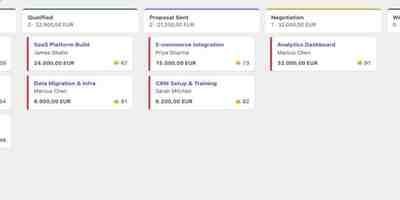
| Example stage | Meaning | Typical next action |
|---|---|---|
| Lead | New contact or inquiry not yet qualified | Review fit and contact the lead |
| Qualified | Need, budget, or fit has been confirmed | Define scope or schedule discovery |
| Proposal | A commercial proposal has been sent | Follow up and answer objections |
| Negotiation | Terms are actively being discussed | Resolve remaining commercial points |
| Won / Lost | The opportunity has reached an outcome | Handoff to delivery or record the loss reason |
How do leads get into a WordPress CRM?
The strongest setup minimizes manual re-entry. Website forms, landing pages, or other lead sources should be able to create or update CRM records while preserving enough context for sales follow-up.
For example, GrowthCRM provides a WordPress-native CRM with contacts, deals, pipeline management, lead capture, and configurable lead scoring. Its product workflow is designed so website behavior and lead data can feed the CRM while the customer records remain in WordPress.
What should you track on each contact?
Start with the minimum information needed to sell and serve effectively. A small business often needs name, company, contact details, source, owner, relevant notes, and open deals. Add custom fields only when they support a real decision or workflow.
Collecting extra data “just in case” usually makes the CRM harder to maintain. It can also increase the amount of personal data your team must govern. Keep the data model proportional to the sales process.
How should lead scoring work?
Lead scoring can help a small team prioritize follow-up when the website generates more inquiries than the team can handle equally. A useful score should reflect behaviors or attributes that have a real relationship with buying intent.
Examples might include visiting a pricing page, returning to the site, submitting a high-intent form, or matching a target company profile. The exact scoring model should be tested against your own sales process rather than copied blindly from another business.
| Signal | Possible interpretation | Action |
|---|---|---|
| Pricing page visit | Potential commercial intent | Review with other signals before prioritizing |
| Demo/contact form | Explicit request for engagement | Assign an owner and follow up |
| Repeat visits | Sustained interest | Use as supporting context |
| Poor customer fit | Lower sales priority despite engagement | Qualify before investing more sales time |
Self-hosted WordPress CRM vs SaaS CRM
A self-hosted WordPress CRM and a SaaS CRM can both manage a pipeline, but the operating model is different. With a WordPress-native approach, the business manages the hosting environment and keeps CRM records in its own WordPress stack. A SaaS product shifts more infrastructure management to the vendor but also places the workflow and data inside an external platform.
| Consideration | Self-hosted WordPress CRM | SaaS CRM |
|---|---|---|
| Data location | Your WordPress environment | Vendor-managed infrastructure |
| Infrastructure responsibility | Your team or hosting provider | Primarily the SaaS vendor |
| WordPress integration | Native or close to the site workflow | Usually through integrations or APIs |
| Customization | Depends on plugin and WordPress stack | Depends on vendor plan and platform limits |
If you are specifically comparing cloud CRM products with a WordPress-native stack, see the guides to Pipedrive alternatives and HubSpot alternatives for WordPress.
How do you handle permissions and CRM data?
Not every WordPress user should see every CRM record. Define which roles can view contacts, edit deals, change pipeline stages, export data, or manage settings. Apply the principle of least privilege: give each role the access it needs, and no more.
Also include CRM data in your normal WordPress backup, security, and access-management processes. A self-hosted CRM gives you more infrastructure control, but that control comes with responsibility for hosting, backups, updates, and account security.
What happens after a deal is won?
The sales process should not end in a dead-end “Won” column. Decide what happens next: create the client, open a delivery project, assign the account owner, prepare onboarding, or expose relevant information through a client portal.
GrowthCRM can optionally hand a won deal into GrowthProjects so the sales-to-delivery transition stays inside the same WordPress stack. For the client-facing side of delivery, the guide to building a secure WordPress client portal covers access and project visibility.
Run your sales pipeline inside WordPress
GrowthCRM combines contacts, deals, pipeline stages, lead capture, notes, and lead scoring in a self-hosted WordPress CRM.
A practical setup checklist
- Define the minimum contact and deal fields you genuinely need.
- Create a short pipeline that reflects real buying milestones.
- Assign ownership rules so every open deal has a responsible person.
- Connect website lead capture to the CRM where appropriate.
- Set permissions for sales users and administrators.
- Define what happens automatically or manually when a deal is won.
- Review the pipeline regularly and remove fields or stages that add no value.
Conclusion
A WordPress CRM for a small business works best when it stays focused. Start with contacts, deals, stages, ownership, notes, and reliable lead capture. Keep the pipeline easy to understand, connect sales activity to the rest of the customer workflow, and treat hosting, permissions, backups, and updates as part of the CRM system rather than separate concerns.
Frequently asked questions
Is WordPress suitable for a small business CRM?
Yes, when the business wants a CRM integrated with its WordPress environment and is comfortable managing the hosting and maintenance responsibilities that come with self-hosting.
What is the minimum information a CRM should track?
For many small businesses, start with contacts, company information, open deals, pipeline stages, ownership, notes, and next actions. Add more fields only when they support a real sales or reporting requirement.
Can a WordPress CRM capture website leads?
Yes. Depending on the plugin, forms or APIs can create CRM records from website inquiries so sales teams do not have to re-enter every lead manually.
Should every sales activity affect lead scoring?
No. Use signals that have a plausible relationship with buying intent and validate them against your own sales outcomes. Too many low-value scoring rules make prioritization less useful.
Where is data stored in a self-hosted WordPress CRM?
With a WordPress-native self-hosted CRM, CRM data is stored within the WordPress environment rather than in a separate CRM SaaS account. The exact storage model depends on the plugin.