Support that lives on your site
WordPress Ticket System with a Client Portal and Agent Inbox
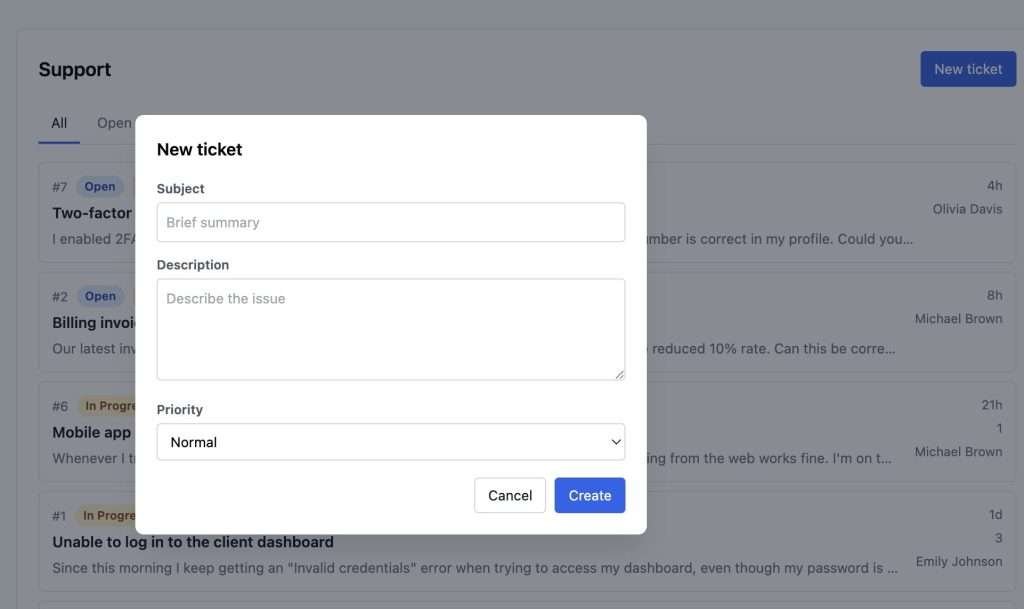
Tickets your clients can see. Replies only your team writes.
GrowthSupport adds a private support portal directly inside WordPress. Clients log in to open tickets, follow replies and mark issues resolved — no third-party account required.
- Priority levels: urgent, high, normal, low
- Statuses: open → in progress → resolved → closed
- REST API + action hooks for custom automations
- Roles: gs_create_tickets / gs_manage_tickets
Up and Running in 3 Steps
1
Install & Activate
Upload the plugin via Plugins → Add New. Activate it — capabilities are granted automatically to all existing roles.
2
Add the Shortcode
Create a new page and paste [growthsupport]. The full ticket portal loads on that page for logged-in users.
3
Open Your First Ticket
Have a client log in and submit a ticket. Assign priority, reply from wp-admin, and close it when done — all without leaving WordPress.
Why not just use Zendesk or Freshdesk?
GrowthSupport gives you everything a hosted helpdesk offers — without the monthly invoice or the data leaving your server.
| Feature | GrowthSupport | Zendesk / Freshdesk |
|---|---|---|
| Ticket management | ✅ Full | ✅ Full |
| Priority levels | ✅ 4 levels | ✅ Yes |
| Client roles | ✅ WordPress roles | ⚠️ Separate login |
| REST API | ✅ Included | ✅ Paid plan |
| MCP / AI-agent ready | ✅ Native | ❌ No |
| Data on your server | ✅ Always | ❌ Their cloud |
| Monthly cost | ✅ $0 | ❌ $15–$95/agent |
AI-Ready
Built for the agentic web. Native to WordPress 7.
GrowthSupport exposes its full support-ticket surface through the new WordPress Abilities API. Any AI assistant, MCP client or automation can discover, schema-validate and safely invoke your tickets, replies and diagnostics — with the same capability checks your team already uses.
WordPress 7.0+
Abilities API
MCP-compatible
JSON Schema typed
Capability-aware
What your AI can do
| Category | Abilities | Sample |
|---|---|---|
| Tickets | 6 | list-tickets / create-ticket |
| Diagnostics | 3 | get-summary / get-open-tickets |
- Ask in plain language. “List all urgent open tickets” or “Close ticket #42 and post a resolution note”.
- Safe by design. Every ability declares readonly, idempotent or destructive intent.
- Your permissions still apply. Each call goes through WordPress capabilities.
- Tune it from wp-admin. Decide which abilities are exposed to MCP clients.
9 typed abilities across 2 categories, registered under the growthsupport/* namespace. Requires WordPress 7.0+.
How Our WordPress Ticket System Organises Client Requests
🏢
WordPress Agencies
Install once, deploy across every client site. Each client gets a private support channel without a separate SaaS subscription.
🛒
WooCommerce Stores
Handle order questions and product issues right where your data lives. No customer ever leaves your domain to get support.
🔒
Privacy-First Teams
All ticket data stays in your own database. No EU data-transfer issues, no vendor lock-in, no terms-of-service surprises.
Frequently Asked Questions
Do clients need a WordPress account?
Yes. Clients log in with a standard WordPress subscriber account. You can create those manually or via any membership plugin. The plugin grants the gs_create_tickets capability to all subscriber-level users on activation.
Is it compatible with multisite?
Yes. Activate it per-site or network-wide. Each sub-site gets its own isolated ticket tables.
What happens to my data if I deactivate the plugin?
Your gs_tickets and gs_ticket_replies tables remain intact. Reactivating the plugin immediately restores full access — there is no data loss on deactivation.
Can I replace my current helpdesk SaaS?
For teams already on WordPress, yes. GrowthSupport covers ticket creation, priority, status workflow, threaded replies and diagnostics — everything you need to stop paying for a third-party SaaS.
Can I integrate it with other tools?
Yes. GrowthSupport exposes a REST API plus action and filter hooks (ticket created, status changed, reply posted), so you can wire up email notifications, Slack alerts or any custom automation.
Can I use it for client support?
Absolutely. Install it on any site you manage to give each client a private support channel tied to their own login — with no recurring SaaS cost attached.