Project profitability is the difference between what a project earns and what it really costs to deliver. For agencies, freelancers, and small teams, that means tracking more than invoices: you also need direct expenses, recurring tool costs, and the time your team spends on delivery.
Quick answer: Track revenue, project expenses, recurring costs, and hours in the same project view. Then monitor net profit, margin, and effective hourly rate so you can see which projects are healthy before the numbers become a surprise.

GrowthBalance: Your Project Profitability Tracker
Track time, income and expenses for every project and side-project you run — 100 % front-end, self-hosted inside WordPress. No SaaS subscription, no per-seat fees.
What should a project profitability tracker measure?
A useful project profitability tracker connects four inputs: revenue, direct expenses, recurring costs, and time. Looking at only one of them can produce a misleading picture. A project can bring in strong revenue and still underperform if it consumes too many hours or carries recurring delivery costs that never make it into the project report.
| Metric | What it tells you | Typical inputs |
|---|---|---|
| Revenue | How much the project has earned | One-time fees, retainers, recurring income |
| Direct expenses | Costs attributable to that project | Contractors, licenses, media, hosting, purchases |
| Time | How much delivery effort the project consumes | Billable and non-billable project hours |
| Effective hourly rate | What the project earns relative to time invested | Net project value divided by tracked hours |
How to calculate project profitability
At its simplest, project profit is revenue minus the costs required to deliver the work. The important part is defining those costs consistently. If a software license, contractor, or annual platform fee exists because of the project, it should not disappear from the calculation simply because it is billed outside the project invoice.
A practical workflow is:
- Record all project income.
- Assign direct one-time expenses.
- Allocate recurring costs to the months in which they apply.
- Track time spent on delivery and project administration.
- Compare the resulting balance and effective hourly rate with the targets you set for the work.
Why time changes the profitability picture
Two projects can show the same accounting profit and still have very different economics. If one requires twice as many hours, its effective hourly rate is lower and it consumes capacity that could have been used elsewhere.
This is why time tracking belongs in the profitability view rather than in a separate report that nobody reconciles. If your team already tracks project time, connect those hours to the financial view. If you are still trying to separate productive work from internal overhead, the guide to tracking non-billable time in WordPress is a useful companion.
How recurring costs should be handled
Recurring costs are easy to underestimate because they often sit outside a project budget. Hosting, software licenses, subcontractor retainers, or annual services can quietly reduce margin month after month.
Instead of treating an annual expense as if it only affected the month in which it was paid, a profitability tracker can allocate the cost across the relevant period. That gives you a more useful operating view of the project over time.
| Cost pattern | Recommended treatment | Why |
|---|---|---|
| One-time contractor cost | Assign directly to the project | It belongs to one delivery event |
| Monthly software subscription | Record monthly while active | It affects ongoing margin |
| Annual hosting or platform fee | Allocate across the applicable months | Avoids distorting a single month |
| Shared agency overhead | Use a consistent allocation policy if included | Keeps comparisons consistent |
What warning signs should agencies watch?
The purpose of profitability tracking is not to produce prettier reports. It is to surface decisions early enough to act on them.
- Negative project balance: income has not yet covered recorded expenses.
- Recurring monthly loss: ongoing costs exceed recurring project income.
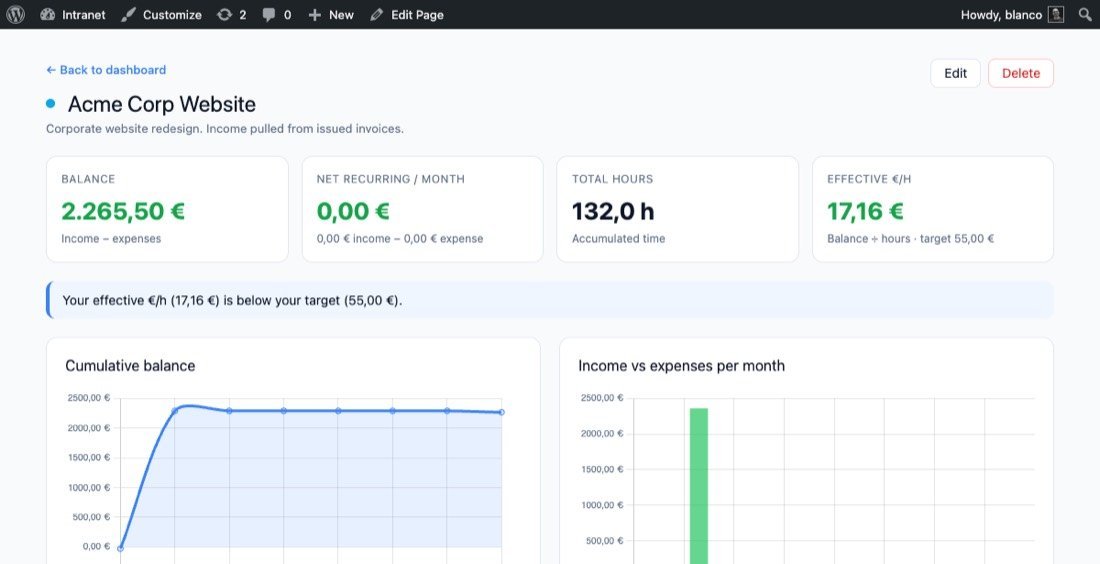
- Effective hourly rate below target: the project is consuming more delivery time than its economics support.
- Hours rising without revenue changing: scope may be expanding without a corresponding commercial adjustment.
- Healthy revenue but weak cash contribution: hidden costs may be eroding the apparent margin.
How to track project profitability in WordPress
If your projects already live in WordPress, keeping profitability data in the same environment can reduce manual reconciliation. A self-hosted setup can connect projects, time entries, invoices, and financial reporting without exporting every update into another SaaS dashboard.
GrowthBalance is designed for this use case. It combines project income, expenses, recurring amounts, time, balance, effective hourly rate, and viability signals in a WordPress-native project view. When used with GrowthProjects, project time can feed the profitability view; when used with GrowthInvoices, issued invoices can flow into income tracking.
Track project profitability inside WordPress
Use GrowthBalance to connect project income, expenses, recurring costs, and hours so you can see balance and effective hourly rate in one place.
A simple project profitability example
Suppose a project generates $8,000 in revenue. It has $1,200 in direct expenses and $300 in allocated recurring costs. Before considering time, the project contributes $6,500. If the team records 100 hours, the effective contribution per tracked hour is $65.
This example is intentionally simple. In practice, decide whether payroll, overhead, taxes, and other indirect costs belong in your project model, then use the same method consistently across projects. Consistency matters more than making the model unnecessarily complex.
| Example input | Amount |
|---|---|
| Project revenue | $8,000 |
| Direct expenses | $1,200 |
| Allocated recurring costs | $300 |
| Contribution before other overhead | $6,500 |
| Tracked hours | 100 |
| Contribution per tracked hour | $65 |
How profitability connects to invoicing
Profitability and invoicing are related but not identical. An invoice tells you what you charged; profitability tells you what remained after the work and costs required to earn that revenue. If invoicing is part of your WordPress workflow, see the guide to WordPress invoicing for freelancers and small businesses.
Conclusion
A project profitability tracker should help you answer three questions quickly: Is this project making money? Is it using time efficiently? Is its current trend sustainable? Connecting revenue, expenses, recurring costs, and time in one view makes those answers easier to see and easier to act on.
Frequently asked questions
What is project profitability?
Project profitability is the financial result of a project after accounting for the costs required to deliver it. Teams often supplement this with margin and effective hourly rate to understand how efficiently the project uses time and resources.
What costs should be included in project profitability?
Include costs that are meaningfully attributable to the project, such as contractors, software, hosting, purchases, and other delivery expenses. If you allocate shared overhead, use the same allocation method across projects.
Why track effective hourly rate?
Effective hourly rate connects project economics to time. It helps reveal when a project looks profitable in total dollars but consumes too much delivery capacity.
Can WordPress track project profitability?
Yes. A WordPress-native tool can store project income, expenses, recurring costs, and time in the same self-hosted environment as your project workflow.
How often should project profitability be reviewed?
Review it often enough to act before a project ends. For ongoing client work, a monthly review is a practical baseline, while high-volume or fast-moving projects may benefit from more frequent checks.