Track · Earn · Decide
Project Profitability Tracker for Income, Expenses and Time
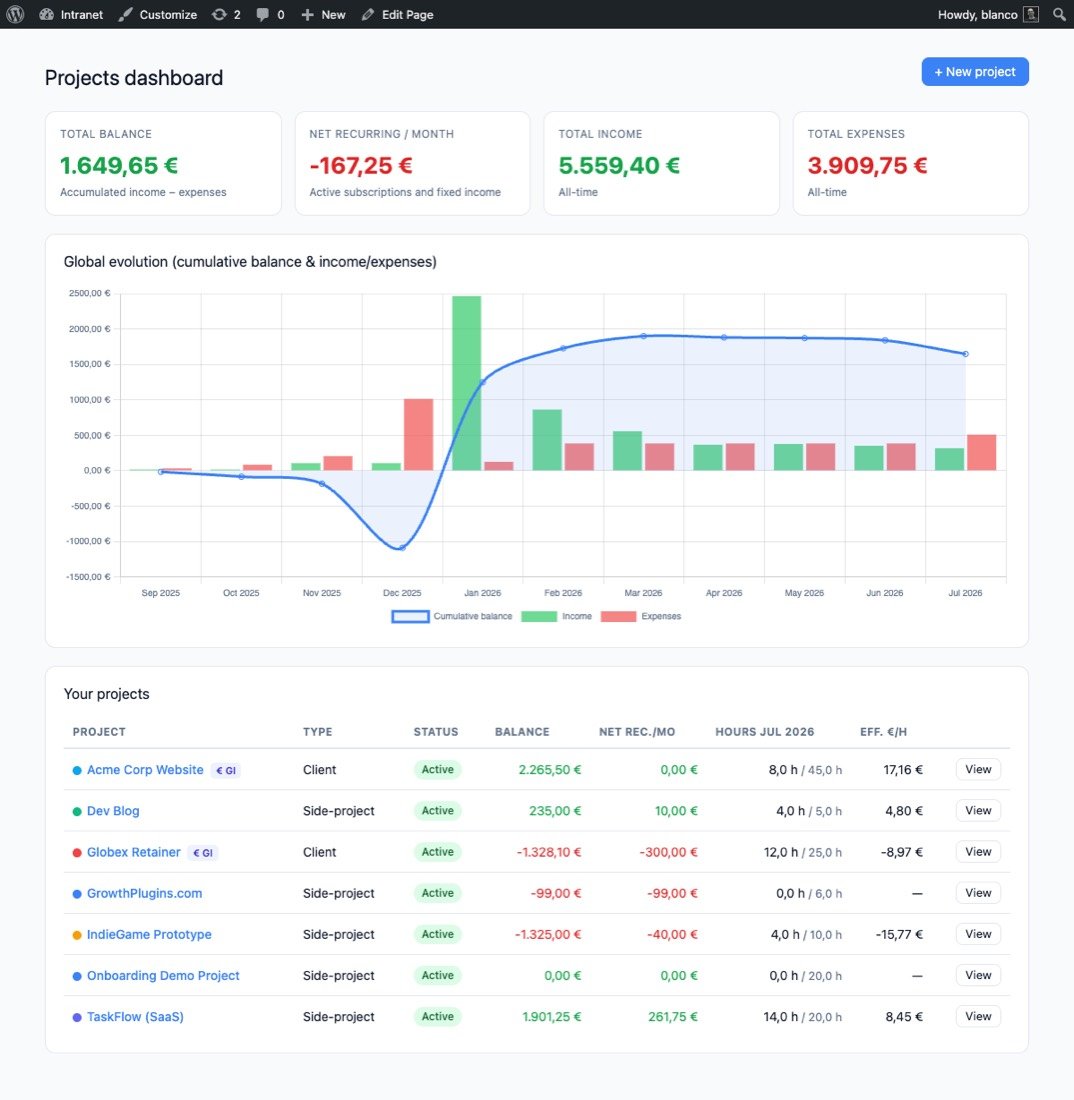
Projects dashboard at a glance
See the health of every project in one view. Four KPI cards — total balance, net recurring income, all-time income and expenses — plus a cumulative balance chart that covers the full life of each project.
- Balance, MRR, income & expenses in one view
- Per-project effective €/h vs. your target rate
- Current-month hours with optional monthly target
Automatic viability analysis
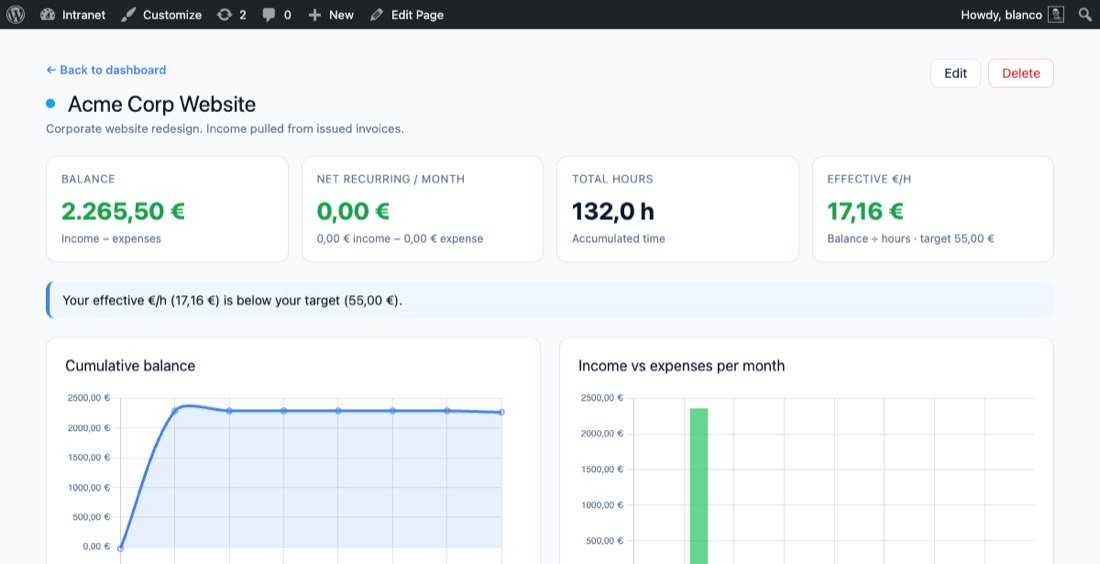
GrowthBalance reads your numbers and tells you what they mean. Is the project losing money every month? How many months does the current balance cover? Is your effective hourly rate above or below target? You get a clear verdict — no spreadsheet needed.
- Recurring loss warning with runway in months
- Negative balance alert when investment not yet recovered
- Effective €/h vs target — green tick or nudge
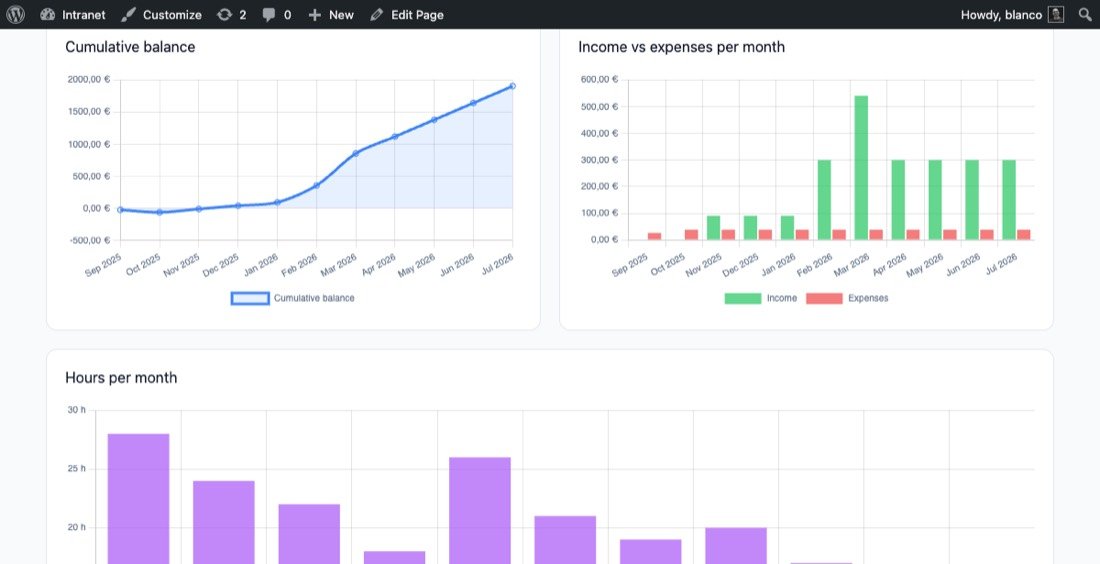
Income & expenses with smart recurrence
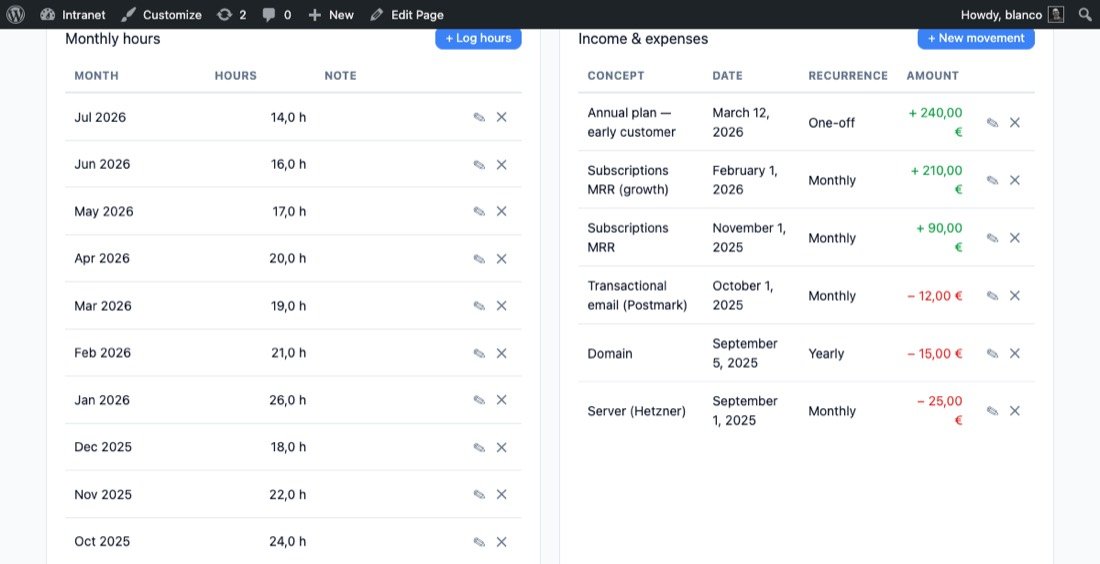
Log one-off payments, monthly subscriptions and annual costs. GrowthBalance amortises recurring amounts correctly across every month — a yearly hosting fee appears as cost/12 in each period, so your charts always tell the real story.
- One-off, monthly and yearly recurrence
- Optional end date for subscriptions that stop
- Net MRR card — active recurring income minus costs
Time tracking & sibling integrations
Log hours manually per month, or link a project to a GrowthProjects workspace and the time tracker feeds the charts automatically. Link it to a GrowthInvoices client and issued invoices flow in as income — zero double-entry.
- Manual monthly hours log with notes
- Auto-sync from GrowthProjects time entries
- Auto-sync income from GrowthInvoices issued invoices
Up and Running in 3 Steps
1
Install & Activate
Upload GrowthBalance and activate it. Three lightweight database tables are created automatically — no configuration required.
2
Add the Shortcode
Create a new page and paste [growthbalance]. Or use GrowthBalance → Settings to auto-create the page for you in one click.
3
Create your first project
Click + New project, set a name, type, target hourly rate and monthly hours goal. Add your first income or expense and watch the balance chart come to life.
GrowthBalance Free vs. SaaS Alternatives
See how GrowthBalance stacks up against paid time and money tracking tools.
| Feature | GrowthBalance Free | Wave | FreshBooks | Harvest |
|---|---|---|---|---|
| Self-hosted on your WordPress | ✓ | ✗ | ✗ | ✗ |
| You own 100 % of your data | ✓ | ✗ | ✗ | ✗ |
| Per-project balance & KPIs | ✓ | ✗ | Partial | Partial |
| Viability analysis (MRR / runway / €/h) | ✓ | ✗ | ✗ | ✗ |
| Recurring expenses amortised monthly | ✓ | Partial | ✓ | ✗ |
| Time tracking per project | ✓ | ✗ | ✓ | ✓ |
| Side-project & client project types | ✓ | ✗ | ✗ | ✗ |
| Native WordPress integration | ✓ | ✗ | ✗ | ✗ |
| Per-user monthly fee | None | Free / $16+ | $17+ | $11+ |
Measure Your Effective Hourly Rate with a Project Profitability Tracker
Anyone who runs projects and wants to know if they are actually profitable.
Freelancers & consultants
Track what each client really earns you per hour. Log retainers, one-off projects and recurring tool costs — and finally know which clients are worth keeping.
Side-project makers
Know when your side-project breaks even. Track MRR, hosting costs and the hours you invest — so you can decide with data whether to scale, pivot or park it.
Small agencies
Each team member gets their own independent project view. Pair with GrowthProjects for task-level time tracking and GrowthInvoices for automatic income sync — your whole stack on one WordPress.
Frequently Asked Questions
Is GrowthBalance free?
Yes. The full plugin — projects dashboard, income & expense tracking, time log, viability analysis and all charts — is available at no cost, with no per-user or per-project limits.
Does it work with my theme?
Yes. The app is rendered entirely via the [growthbalance] shortcode with self-contained styles. It drops into any page on any modern WordPress theme (6.0+) without conflicts.
Can I track both client projects and personal side-projects?
Absolutely. Each project has a type — Client or Side-project — so you can mix both in one dashboard. Status labels (Active, Paused, Archived) let you keep old projects out of the way without deleting them.
What exactly is the viability analysis?
It is a set of automatic contextual alerts shown in the project detail view. GrowthBalance compares your net recurring income vs. costs, your accumulated balance, and your effective €/h vs. target rate — and outputs plain-language warnings or confirmations so you always know where you stand.
How do the GrowthProjects and GrowthInvoices integrations work?
Both are optional and auto-detected. If GrowthProjects is active, you can link any project to a workspace and its time entries flow into GrowthBalance as monthly hours — no manual logging needed. If GrowthInvoices is active, linking a client pulls issued invoice amounts as income automatically. You can also use GrowthBalance standalone without either sibling plugin.
Who owns my data?
You do — entirely. All projects, transactions and hours are stored in your own WordPress database. Nothing leaves your server. Each user only sees their own data; there are no shared dashboards unless you build them.
Can multiple users track their own projects independently?
Yes. Data is isolated per WordPress user — each logged-in user has their own independent set of projects, transactions and hours. There are no seat limits or extra fees per user.