Non-billable time is any work hour that doesn’t get invoiced to a client, from internal meetings to admin to unpaid rework, and it often consumes a significant portion of a typical week without anyone noticing until margins slip. Tracking it inside WordPress, rather than a separate SaaS dashboard, keeps that data on your own server and ties it directly to the projects and clients you already manage. The fix isn’t eliminating non-billable time. Rather, it’s categorizing it so you can price, staff, and protect margins around it.
TL;DR:
- Tracking non-billable time in WordPress requires defining a simple three-tier taxonomy: billable, client-related non-billable, and internal activities.
- Categorizing all work hours, including internal meetings and admin, helps identify margin erosion and maintain accurate utilization and effective hourly rates.
- Implementing a low-effort, rules-based entry process and weekly hygiene checks ensures reliable data collection without burdening team members.
- Self-hosted WordPress plugins unify time tracking, project management, and client portals, offering better data control and cost savings over SaaS tools.
- Regular review of utilization and internal time breakdowns guides staffing, pricing, and automation efforts to reduce unprofitable non-billable overhead.
GrowthBalance
Track time, income and expenses for every project and side-project you run — 100 % front-end, self-hosted inside WordPress. No SaaS subscription, no per-seat fees.
Table of Contents
- What Counts as Non-Billable Time in WordPress Project Tracking?
- Why Does Tracking Non-Billable Hours Protect Profitability?
- How Do You Build a Non-Billable Time Tracking System That Works?
- Setting Up Non-Billable Time Tracking Inside WordPress
- How Do You Calculate Utilization Rate and Effective Hourly Rate?
- What Are the Best Ways to Reduce Non-Billable Overhead?
- What Reports Turn Time Data Into Decisions?
- How GrowthPlugins Users Improved Non-Billable Tracking
- Why a Self-Hosted Approach Makes Sense for This Problem
- Get Non-Billable Tracking Working Inside Your Own WordPress Site
- Sources
- FAQ
What Counts as Non-Billable Time in WordPress Project Tracking?
Non-billable time is any hour spent working that you cannot invoice to a client under the current contract scope. That sounds simple until you start categorizing real work, because the line moves depending on what a contract actually covers.
Some categories show up in nearly every freelance or agency workflow:
- Internal meetings — team standups, retrospectives, planning sessions
- Admin work — invoicing, timesheet cleanup, CRM updates, email triage
- Training and skill development — onboarding new tools, certifications, learning a client’s tech stack
- Presales and business development — proposals, discovery calls, scoping documents before a signed contract
- Rework and scope corrections — fixing errors not covered by the original agreement
The tricky part is that contract scope changes billability on the same task. A discovery call is non-billable when you’re pitching a prospect, but billable the moment it’s written into a signed retainer as part of ongoing strategy work. A minimal taxonomy that labels every entry as billable, non-billable client-related, or internal keeps this distinction visible instead of buried in a spreadsheet nobody checks. Billable time maps to a client and a contract line. Non-billable time supports the business but doesn’t generate direct revenue, and both need a home in your tracking system.
Why Does Tracking Non-Billable Hours Protect Profitability?
Untracked non-billable time doesn’t disappear. It just becomes invisible in your utilization numbers, which means your effective hourly rate looks better on paper than it actually is. A team that logs only billable hours has no way to see that a senior developer is spending nine hours a week in status meetings that never touch a client invoice.
Workforce analytics that separate billable from non-billable work consistently surface the same pattern: internal meetings, redundant admin, and after-hours catch-up work quietly erode margins long before anyone flags a profitability problem. The same visibility gap tends to correlate with burnout, since the people absorbing the most invisible non-billable work are usually your most reliable staff, the ones who get handed “just one more internal thing” because they won’t push back.
There’s a compliance angle too, and it’s easy to miss. Under the Fair Labor Standards Act, covered non-exempt employees must have all hours worked recorded, and overtime calculations depend on total hours worked, not whether that time was billable to a client. If your timesheet only captures client-facing hours, you’re not just missing margin data. You may be missing wage and hour compliance data the Department of Labor expects you to have on file.
How Do You Build a Non-Billable Time Tracking System That Works?
A tracking system only works if entering time takes less effort than skipping it. Most non-billable tracking fails not because people don’t understand the categories, but because the entry process is annoying enough that staff round everything to “internal” and move on.
Here’s a process that holds up across freelance teams and small agencies:
- Adopt a three-tier taxonomy. Billable, non-billable client-related (scoping calls, unpaid rework), and internal (admin, training, meetings). Anything more granular than three tiers tends to collapse under its own complexity within a month.
- Require four fields on every entry. Project or client, category, task description, and duration. Skip any of these and reporting later becomes guesswork.
- Match the entry method to team habits. Timer-based tracking works better for developers who stay on one task for hours; manual end-of-day entry works better for account managers juggling six conversations at once. Forcing one method on both roles is a common reason adoption fails.
- Run a five-minute weekly hygiene check. Scan for entries with no category, duration outliers (a two-minute “meeting” or an eight-hour “admin” block), and missing days before the week closes.
- Train on categories, not just tools. A ten-minute walkthrough of what counts as “client-related non-billable” versus “internal” prevents months of inconsistent labeling.
Pro Tip: Set a hard rule that no time entry closes without a category selected. Leaving it optional guarantees your non-billable data will be too incomplete to trust by the second month.
Setting Up Non-Billable Time Tracking Inside WordPress

If you’re already running client work through WordPress, adding time tracking there instead of a separate app means one login, one database, and one place where project status and time data actually connect. Categorizing entries as billable or non-billable becomes part of the same workflow as managing the project itself, rather than a second system you have to remember to update.
The setup checklist looks like this:
- Install a project management and time-tracking plugin built for WordPress, rather than an embedded iframe pointing to an outside SaaS tool
- Configure your billing-status taxonomy (billable, non-billable client-related, internal) as a field on every time entry
- Create project and client records that time entries attach to automatically
- Set roles and permissions so team members log their own time while managers see cross-project reporting
- Start timers or enable manual entry, depending on the role, per the hygiene rules above
- Export weekly reports or view dashboards directly inside the WordPress admin
The privacy and cost argument matters more here than it first appears. Self-hosted tools mean client data stays on your own server instead of a third-party’s cloud, which is a real consideration for agencies handling sensitive client information under GDPR or client confidentiality agreements. It’s also a one-time purchase model rather than a recurring per-seat SaaS fee, which changes the math for a five-person agency running four or five different tools. A single-agency case study on boosting billable hours with GrowthPlugins shows what that consolidation looks like in practice: fewer logins, less duplicate data entry, and a clearer view of where hours actually go.
How Do You Calculate Utilization Rate and Effective Hourly Rate?
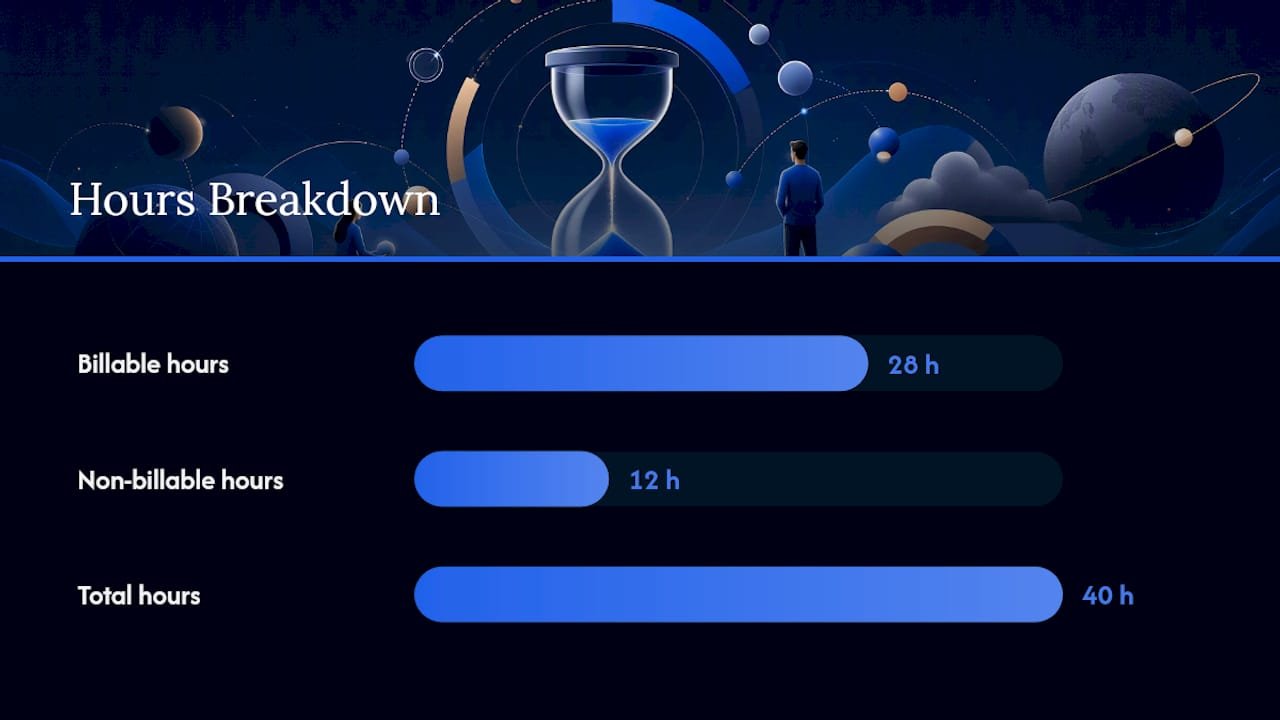
Two numbers tell you almost everything about whether your non-billable time is a problem or just normal overhead: utilization rate and effective hourly rate.
Utilization rate = (billable hours ÷ total hours worked) × 100
For example, if a consultant works 40 hours in a week and logs a portion as billable, you can calculate the utilization rate accordingly. Industry benchmarks in legal and professional services treat utilization as one of the primary levers for margin and staffing decisions, and firms track it by role because a partner’s target utilization looks nothing like an associate’s.
Effective hourly rate = total revenue ÷ total hours worked (not just billable hours)
If that same consultant bills $150 an hour and generates $4,200 from 28 billable hours, but works 40 hours total, the effective rate drops to $105 an hour once you divide by the full work week. That $45 gap is the real cost of non-billable time, and it’s invisible if you only ever calculate rate against billable hours.
| Metric | What it measures | Track by |
|---|---|---|
| Utilization rate | Billable hours as a share of total hours | Role, team, individual |
| Effective hourly rate | Actual revenue per hour worked (all hours) | Individual, project |
| Non-billable by category | Which internal buckets consume the most time | Category (admin, training, meetings) |
| Client-level unpaid hours | Rework or scope creep by client | Client, project |
Trend lines matter more than any single week’s snapshot. A utilization rate that drifts from 75% to 62% over a quarter tells you something structural changed, whether that’s scope creep, understaffing, or a client relationship generating more unpaid support requests than the contract accounts for.
What Are the Best Ways to Reduce Non-Billable Overhead?
You can’t eliminate non-billable time, and trying to usually backfires by cutting into training or client relationship work that pays off later. What you can do is shrink the categories that add no value and price around the ones that do.
- Automate routine admin. Recurring invoice generation, standard status update emails, and proposal templates cut the small repetitive tasks that add up to hours nobody notices losing.
- Build reusable templates for onboarding, scoping documents, and kickoff calls so presales time shrinks with each new prospect instead of starting from scratch.
- Delegate or outsource tasks that don’t require deep client context, like bookkeeping or basic report formatting, so senior staff spend fewer hours on work that doesn’t need their expertise.
- Bill for onboarding explicitly rather than absorbing it as overhead, especially for complex client setups that take real hours before any billable work starts.
- Package recurring internal work into retainer pricing, so the account management time you already know a client needs each month is priced in rather than treated as free.
AI and automation are already reshaping how professional services firms handle internal versus billable work, and the trend applies well beyond legal practices. Anywhere document review, scheduling, or first-draft proposals can be automated, that’s non-billable time that stops competing with client work for your best people’s attention.
Pro Tip: Before outsourcing anything, run it through your non-billable category report first. If a task shows up as a recurring line item every single week, it’s a candidate for a template or automation, not just a one-off delegation.
What Reports Turn Time Data Into Decisions?
Data that nobody reviews is just noise. A minimal reporting cadence keeps non-billable tracking useful instead of becoming an abandoned habit by month three.
Weekly, check a utilization dashboard and flag any obvious gaps, like a team member logging zero non-billable time, which usually means missing entries, not perfect efficiency. Monthly, run a margin report that breaks down non-billable hours by category and compares it against the prior month’s trend. Quarterly, use utilization and effective rate trends to inform staffing and pricing reviews.
The essential report set is short: a utilization dashboard by role, a client-level view of unpaid hours, and a category breakdown of internal non-billable time. When utilization drops for two consecutive months, that’s a staffing or scope conversation, not a wait-and-see situation. When one non-billable category keeps growing quarter over quarter, that’s your next automation or outsourcing candidate.
How GrowthPlugins Users Improved Non-Billable Tracking
A small agency running client work through WordPress consolidated four separate tools into one dashboard and saw billable hours increase once non-billable admin time stopped competing for attention across multiple logins. A freelancer’s time-tracking case study showed a similar pattern: categorizing entries consistently made invoicing faster and cut the end-of-month reconciliation work down to minutes instead of hours.
The features doing the heavy lifting in both cases were the same: integrated time tracking tied to Kanban boards, so category labels stayed attached to the actual task, and a client portal that let account managers see unpaid hours without a separate spreadsheet. That combination is what turns a taxonomy from a good idea into something a team actually maintains.
Why a Self-Hosted Approach Makes Sense for This Problem
Non-billable time tracking fails most often for a boring reason: the tool doing the tracking lives somewhere separate from the tool managing the project, so the data never lines up. That’s the core argument for keeping time tracking, project boards, and client communication in one self-hosted WordPress dashboard instead of stitching together three subscriptions.
The trade-off is real. Self-hosting means you own setup and updates instead of a vendor handling them for you, and that’s more work upfront than signing up for a SaaS trial. What you get back is data that never leaves your server, no recurring per-seat fees eating into the margin you’re trying to protect, and a workflow where billing status lives next to the actual task instead of in a disconnected app. For teams already frustrated by juggling logins, that trade usually pays for itself within the first project. The case studies referenced above show what that looks like in practice, not in theory.
— Antonio
Get Non-Billable Tracking Working Inside Your Own WordPress Site
Growthplugins is the alternative to stacking separate time-tracking, project management, and client-portal subscriptions. One self-hosted setup replaces all three, with no recurring per-seat fee eating into the margin you just learned how to calculate.
Everything covered here, from the three-tier taxonomy to weekly hygiene checks to utilization dashboards, works inside a single WordPress install with GrowthPlugins’ Kanban boards, time tracking, and client portal running under one login. Categorize entries as billable or non-billable at the source, and your utilization data stays accurate without a second tool to maintain. If you’re comparing options against tools like ClickUp or Asana, the step-by-step setup guide and starter bundle walks through installing the plugin, setting your taxonomy, and running your first weekly report, all in under five minutes to get started.
Sources
- Hours worked under the Fair Labor Standards Act (FLSA) — U.S. Department of Labor
- Track non billable time — Everhour
- Track non billable work to protect margins — ActivTrak
- Relative performance measures report 2024 — Thomson Reuters
FAQ
Do I still get paid for non-billable hours?
If you’re an hourly employee, yes. Non-billable hours are still hours worked, and under FLSA rules, they count toward your pay and any overtime calculation. Freelancers and contractors typically aren’t paid directly for non-billable time unless it’s built into their retainer or project fee.
What does “non-billable employees” mean?
It refers to staff whose work doesn’t get invoiced directly to clients, like HR, internal operations, or support roles, as opposed to a “non-billable hour” for an otherwise billable employee doing internal work.
What does a non-billable amount mean on an invoice or provider statement?
It refers to the portion of time or cost that a provider performed but did not charge the client for, often due to contract scope limits, write-offs, or internal absorption of the cost.
What is the difference between billable and non-billable hours?
Billable hours map directly to a contract line a client pays for. Non-billable hours support the business (admin, training, presales, internal meetings) but generate no direct invoice, even though they’re still real hours worked and still need to be logged and factored into pricing.
Recommended
- How to Effectively Integrate Time Tracking into Your WordPress Workflow Using GrowthPlugins – GrowthPlugins
- Time Tracking Made Easy: A Freelancer’s Success Story with GrowthPlugins’ Integrated Solutions – GrowthPlugins
- Time Doctor Alternatives for WordPress: Privacy-First Picks
- Leveraging GrowthPlugins for Enhanced Time Management in Your WordPress Projects – GrowthPlugins