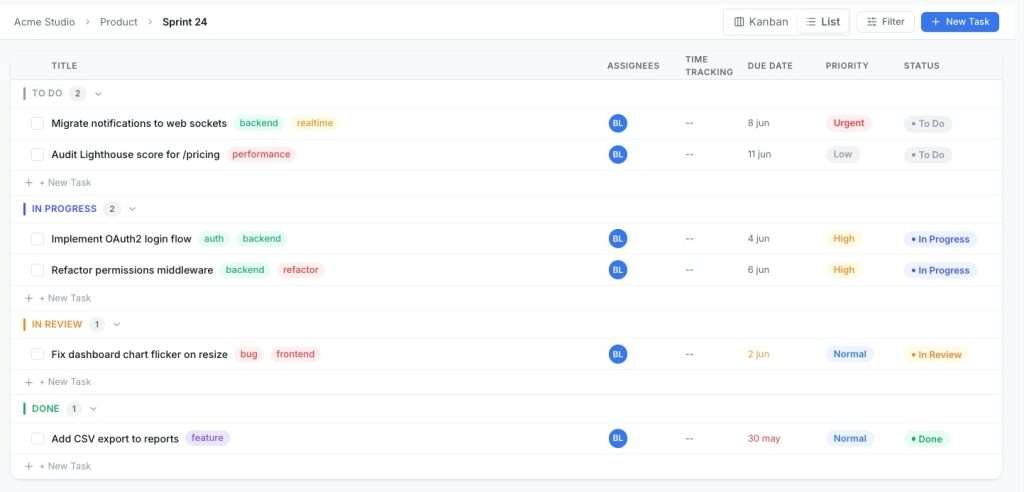
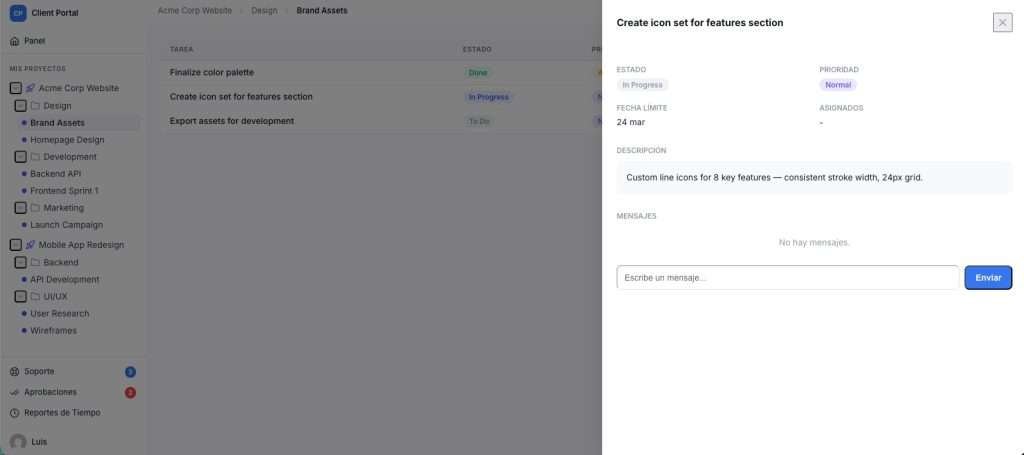
The three tools worth your time right now: Plane (best overall, open-source with full self-hosting), Growthplugins (best for WordPress-hosted teams who want a one-time purchase and full data ownership), and ClickUp (best when your team spans engineering, marketing, and ops). Linear itself sets a high bar for keyboard-first speed and opinionated workflows, so switching always costs something. Migration effort ranges from a few hours for a 5-person team on Plane (which has a documented import path) to several days of engineering time for a 100-seat org moving to Jira or ClickUp.
Top-3 shortlist:
- Plane — preserves Linear’s cycle-based, engineer-first model; open-source and self-hostable on a modest VPS
- Growthplugins — self-hosted WordPress plugins with Kanban, time tracking, and client portal; one-time purchase, zero per-seat fees
- ClickUp — broadest feature set for cross-functional teams; heavier to configure but unmatched reporting depth

GrowthProjects: A WordPress Project Manager Plugin
Self-hosted project management (Kanban, tasks, time tracking) for WordPress. Read the technical documentation →
Table of Contents
- What do the best linear alternatives look like side by side?
- Short reviews of the top alternatives
- Which alternative fits your team?
- Switching from Linear: migration checklist and timeline
- Pricing, TCO, and free-tier availability
- Key Takeaways
- Why self-hosted often wins for the teams that actually need it
- Growthplugins: project management that lives on your server
- Useful sources and vendor pages to read next
- FAQ
What do the best linear alternatives look like side by side?
| Tool | Best for | Deployment | Free tier / price | Keyboard-first / speed | Docs / wiki | Intake & approvals | Analytics | Integrations & API | Migration from Linear |
|---|---|---|---|---|---|---|---|---|---|
| Plane | Engineering teams wanting OSS | Cloud + self-hosted | Free (cloud); self-hosted free | Strong | Pages (built-in) | Intake forms | Basic | REST API, GitHub | Import guide available |
| Shortcut | Mid-size eng teams | Cloud only | No free tier; paid per user | Strong | Limited | Basic | Moderate | GitHub, Slack, Zapier | Manual CSV |
| Jira | Enterprise / compliance | Cloud + Data Center | Free up to 10 users | Moderate | Confluence (add-on) | Advanced | Deep | Extensive | CSV / API |
| ClickUp | Cross-functional orgs | Cloud + self-hosted option | Free tier available | Moderate | Docs built-in | Forms + approvals | Deep | 1,000+ integrations | CSV import |
| Asana | Non-engineering teams | Cloud only | Free up to 15 users | Low | Limited | Forms | Moderate | 1000+ integrations | CSV |
| GitHub Projects | Small dev teams in GitHub | Cloud (GitHub-hosted) | Free with GitHub | Moderate | None native | None | Basic | GitHub-native | Manual |
| Height | Small eng teams | Cloud only | Free tier | Strong | Basic | None | Limited | GitHub, Slack | CSV |
| Growthplugins | WordPress-hosted teams | Self-hosted (WordPress) | Free core plugins | Moderate | Knowledge base | Support tickets | Basic | WordPress ecosystem | Fresh setup |
Key trade-offs per entry:
- Plane is the closest structural match to Linear among open-source tools, but its reporting is thinner than Jira’s.
- Shortcut keeps Linear’s clean UX but has no self-hosting and no free tier, so TCO climbs fast.
- Jira’s power comes at a configuration cost; plan for admin overhead before you commit.
- ClickUp and Asana offer broader views and reporting but can become noisy without governance policies in place.
- GitHub Projects is free and frictionless if your team already lives in GitHub, but it has no native docs or intake layer.
- Height punches above its weight for small teams but lacks depth for orgs over 20 people.
- Growthplugins trades some integrations breadth for full data ownership and a one-time cost model.
Short reviews of the top alternatives
Plane
Best for: Engineering teams that want Linear’s structure without the per-seat bill.
Plane replicates Linear’s core model almost point for point: issues, cycles (sprints), modules, pages for docs, and intake forms. It’s open-source, and self-hosting runs on a modest VPS with Docker Compose. The managed cloud tier is free for small teams. Keyboard navigation is solid, though not quite as polished as Linear’s command palette.

Trade-offs: Reporting is basic compared to Jira. The self-hosted setup requires someone comfortable with Docker and occasional maintenance.
Pricing: Free on cloud; self-hosted is free; paid managed tiers available.
Migration tip: Plane has a documented import path from Linear — run a pilot import first to catch any custom field gaps before committing.
Shortcut
Best for: Mid-size engineering teams that want a cleaner, less opinionated version of Linear.
Shortcut sits closest to Linear in feel: stories, epics, iterations, and a fast keyboard-driven UI. It’s a cloud-only product with no self-hosting option. The lack of a free tier means a 10-person team pays per user from day one.
Trade-offs: No self-hosting, limited docs/wiki, and pricing adds up at scale without the flexibility of open-source alternatives.
Pricing: Per-user monthly pricing; no free tier.
Migration tip: No direct Linear importer; plan for a CSV export/import and manual field mapping.
Jira
Best for: Enterprises with compliance requirements, complex approval workflows, or existing Atlassian investments.
Jira is the most configurable tool on this list, and that cuts both ways. You can model almost any workflow, but someone has to build and maintain it. The free tier supports up to 10 users. Confluence adds docs, but it’s a separate product.
Trade-offs: Keyboard-first speed is noticeably slower than Linear. Configuration overhead is real, and the admin burden scales with team size.
Pricing: Free up to 10 users; paid tiers per user per month.
Migration tip: Jira’s CSV import handles basic fields well; custom fields and PR links require manual work or a third-party migration script.
ClickUp
Best for: Cross-functional organizations where engineering, marketing, and ops share a single workspace.
ClickUp has the widest feature surface of any tool here: docs, dashboards, forms, time tracking, goals, and 1,000+ integrations. That breadth is genuinely useful for non-engineering teams. The trade-off is noise: without clear governance, ClickUp workspaces tend to sprawl.
Trade-offs: Keyboard-first speed lags behind Linear. Heavy configuration is required to get value from the advanced features.
Pricing: Free tier available; paid plans per user per month.
Migration tip: ClickUp supports CSV import from Linear; attachments and PR links need manual reconnection.
Asana
Best for: Teams where non-engineers are the primary users and project tracking is more important than sprint velocity.
Asana’s timeline, portfolio, and workload views are genuinely strong for program management. It’s not built for developers first, and that shows in the issue model: no native cycle concept, no PR linking out of the box.
Trade-offs: Low keyboard-first score. No self-hosting. Developer integrations require third-party connectors.
Pricing: Free up to 15 users; paid tiers per user per month.
Migration tip: CSV import works for basic task data; sprint/cycle structure won’t map cleanly and needs rebuilding.
GitHub Projects
Best for: Small dev teams already living in GitHub who want zero additional cost.
GitHub-native issue tracking keeps code, issues, and PRs together with no separate subscription. For a 3–8 person team that doesn’t need sprint reports or a docs layer, it’s the pragmatic free path off Linear. The board and table views cover the basics.
Trade-offs: No native docs, no intake forms, no time tracking. Reporting is minimal. Scales poorly past 15 people.
Pricing: Free with any GitHub plan.
Migration tip: Export Linear issues to CSV and import via GitHub’s CSV importer; PR links reconnect automatically since you’re already in GitHub.
Height
Best for: Small engineering teams that want a fast, clean UI without Jira’s complexity.
Height has a genuinely pleasant interface and solid keyboard shortcuts. It’s cloud-only and the free tier is generous for small teams. The product is less mature than Plane or Shortcut, and the integration list is shorter.
Trade-offs: Limited analytics, no self-hosting, and the product roadmap is less predictable than established players.
Pricing: Free tier available; paid plans per user.
Migration tip: CSV import from Linear works for core fields; custom attributes need manual recreation.
Growthplugins
Best for: Freelancers, agencies, and small teams running WordPress who want full data ownership and no recurring per-seat fees.
Growthplugins is a different category from the tools above: it’s a suite of self-hosted WordPress plugins, not a SaaS platform. You get Kanban boards, list view, time tracking, task comments, workspaces and folders, a support ticket system, a client portal, and a knowledge base, all running on your own server. WordPress user and role integration means no separate user management layer.

The one-time purchase model matters at scale. A 10-person team on Linear’s Plus plan pays $1,920 per year; Growthplugins is a one-time plugin cost with no ongoing seat fees.
Trade-offs: No native GitHub PR linking, no command palette comparable to Linear’s, and the feature set is optimized for project and client management rather than pure sprint engineering.
Pricing: Free core plugins; one-time paid upgrades; no subscriptions.
Migration tip: There’s no direct Linear importer. The practical path is exporting your Linear data to CSV, rebuilding your project structure in WordPress, and treating it as a fresh setup. For teams moving from SaaS to self-hosted, that reset is often worth the effort.
The real question isn’t which tool has the most features. It’s whether you need a developer-sprint tool or a full business operations platform. For WordPress-hosted teams managing client projects, invoicing, and support alongside development work, a self-hosted suite that lives inside your existing WordPress install often beats a separate SaaS subscription on every axis that actually matters: cost, privacy, and operational simplicity.
Pro Tip: Before committing to any alternative, export a representative project from Linear and run a pilot import. That single test will surface most field-mapping problems before you’ve moved your whole team.
Which alternative fits your team?
The right pick depends on four constraints more than anything else: team composition, deployment requirements, budget model, and how much of Linear’s keyboard-first speed you’re willing to trade.
Priorities checklist:
- What percentage of your team are engineers vs. non-technical stakeholders?
- Do you need self-hosting or data residency for compliance or privacy reasons?
- Is a per-seat recurring cost acceptable, or do you need a one-time or open-source model?
- Which integrations are non-negotiable (GitHub PR linking, Slack, CI/CD)?
- Do you need advanced reporting, or is basic sprint tracking enough?
- How many “watcher” seats do you need, and does the vendor charge for them?
Questions to ask in a trial:
- How faithfully does the import handle Linear’s custom fields and attachments?
- What are the API rate limits, and do they cover your CI/CD use case?
- Can non-engineering stakeholders get read-only or limited seats without paying full price?
- What’s the backup and export story if you want to leave?
Red flags to watch for:
- No structured import path from Linear (means manual migration at scale)
- Pricing that isn’t publicly listed for the tier you actually need
- API limits that would break your existing GitHub or CI/CD hooks
- Mandatory full per-seat billing for stakeholders who only need to view issues
Decision table by team archetype:
| Team archetype | Best pick | Runner-up | Why |
|---|---|---|---|
| Small engineering team (under 15) | Plane | GitHub Projects | OSS, cycles, self-hosting; GitHub Projects if already in GitHub |
| Cross-functional org (eng + marketing + ops) | ClickUp | Asana | Breadth of views and reporting; Asana if non-engineers dominate |
| Enterprise with compliance needs | Jira | Plane (self-hosted) | Audit trails, Data Center option, Confluence integration |
| WordPress-hosted team or agency | Growthplugins | Plane | One-time cost, data ownership, WordPress role integration |
Switching from Linear: migration checklist and timeline
The biggest mistake teams make is treating migration as a data transfer. It’s also a workflow redesign. Linear’s opinionated model means your team has built habits around its specific state machine, keyboard shortcuts, and cycle cadence. The new tool won’t replicate those exactly.
Migration checklist:
- Export all issues, cycles, and attachments from Linear (CSV + attachment download)
- Audit custom fields and states; document which ones have no equivalent in the target tool
- Run a pilot import with a single representative project (20–50 issues)
- Validate: issue links, attachment URLs, assignees, and custom field values
- Reconnect PR/commit links (usually requires re-linking in the new tool’s GitHub integration)
- Rebuild keyboard shortcuts and workflow automations in the new tool
- Train the team on the new state model and sprint/cycle setup
- Archive the Linear workspace; don’t delete until 30 days post-migration
Timeline estimates:
| Team size | Estimated effort | Who does the work |
|---|---|---|
| 5 seats | 4–8 hours | 1 PM or engineer |
| — | 2–4 days | 1 engineer + 1 PM |
| 100 seats | 1–3 weeks | Dedicated migration lead + engineering support |
Pilot test steps: Import one project, check that all issues appear with correct assignees and states, verify that at least one PR link resolves correctly, and confirm that your most-used automation or webhook still fires. If any of those fail in the pilot, they’ll fail at scale.
Gotchas to watch for:
- Custom fields often don’t map cleanly; budget time to rebuild them manually
- Webhook and CI/CD links break on migration and need re-registration in the new tool
- Attachments may export as local files that need re-uploading rather than migrating as URLs
- Keyboard ergonomics — even tools with strong shortcut layers feel slower for the first two weeks; factor in a productivity dip
Pro Tip: Set a 30-day parallel-run period where both Linear and the new tool are active. It adds overhead but prevents data loss if the import missed anything.
Pricing, TCO, and free-tier availability
Linear’s per-seat cost becomes the primary driver for most teams evaluating alternatives. At $8/user for Standard and $16/user for Plus, a 10-person team on the Plus plan runs $1,920 per year. That’s the baseline to beat.
Free tiers worth knowing:
- Plane — free cloud tier; self-hosted is free with no seat limits
TCO considerations beyond the sticker price:
Jira’s free tier ends at 10 users, and the jump to paid is steep once you add Confluence for docs. ClickUp’s free tier is functional but limits storage and advanced features that most teams actually need. Plane’s self-hosted path removes per-seat costs entirely but adds infrastructure and maintenance overhead, typically a $10–20/month VPS plus occasional admin time.
For WordPress-hosted teams, Growthplugins’ one-time purchase model means the cost comparison isn’t annual vs. annual. It’s a one-time plugin investment against years of recurring SaaS fees. For a team that would otherwise pay $1,920/year on Linear Plus, the break-even on a one-time plugin purchase happens in the first year.
Open-source self-hosting (Plane or similar) can run on modest infrastructure, but factor in the engineering time to set it up and keep it updated. That hidden cost is real, especially for teams without a dedicated DevOps resource.
Key Takeaways
The strongest linear alternative for most engineering teams is Plane: open-source, self-hostable, and structurally close to Linear’s cycle-based model without the per-seat cost.
| Point | Details |
|---|---|
| Best overall pick | Plane preserves Linear’s engineer-first model and supports self-hosting with no per-seat fees. |
| Best for cross-functional teams | ClickUp or Asana cover broader reporting and stakeholder views, but require more configuration governance. |
| Migration effort is real | A 25-seat team should budget 2–4 days; always run a pilot import before committing. |
| Linear’s UX is a genuine trade-off | Every alternative involves some keyboard-speed or workflow-familiarity loss in the first weeks. |
| Best for WordPress-hosted teams | Growthplugins offers Kanban, time tracking, and client portal in a one-time purchase with full data ownership. |
Why self-hosted often wins for the teams that actually need it
The conventional wisdom in tool-switching articles is to find the closest feature match to what you’re leaving. That framing misses the more important question: what kind of infrastructure do you actually want to own?
Most teams evaluating linear alternatives are doing so because Linear’s constraints have become friction. But jumping from one SaaS to another just trades one set of constraints for another, usually with a migration tax on top. The teams that end up happiest after a switch are the ones that used the migration as an opportunity to ask a harder question: should this tool even live outside our infrastructure?
For pure engineering teams with no client-facing work, Plane’s self-hosted option is the answer that gets asked too rarely. The setup cost is real but finite. The ongoing cost is close to zero. And you own the data.
For WordPress-hosted agencies and freelancers, the calculus is even clearer. You already have a server. You already have WordPress. Adding a project management layer that integrates with your existing user roles and client portal, at a one-time cost, is a fundamentally different proposition than paying per seat forever. The feature set won’t match Linear’s sprint tooling exactly, and it shouldn’t need to. The job is different.
The tools that get recommended most often in comparison articles are the ones with the biggest marketing budgets, not necessarily the ones that fit the most teams. Self-hosted and one-time-purchase options are systematically underrepresented in those lists. That’s worth keeping in mind when you’re building your shortlist.
Growthplugins: project management that lives on your server
Linear’s per-seat fees add up fast. For WordPress-hosted teams, there’s a more direct path: Growthplugins’ self-hosted project management suite replaces the core capabilities you’d pay for in Linear or Asana, with no monthly bill and no data leaving your server.
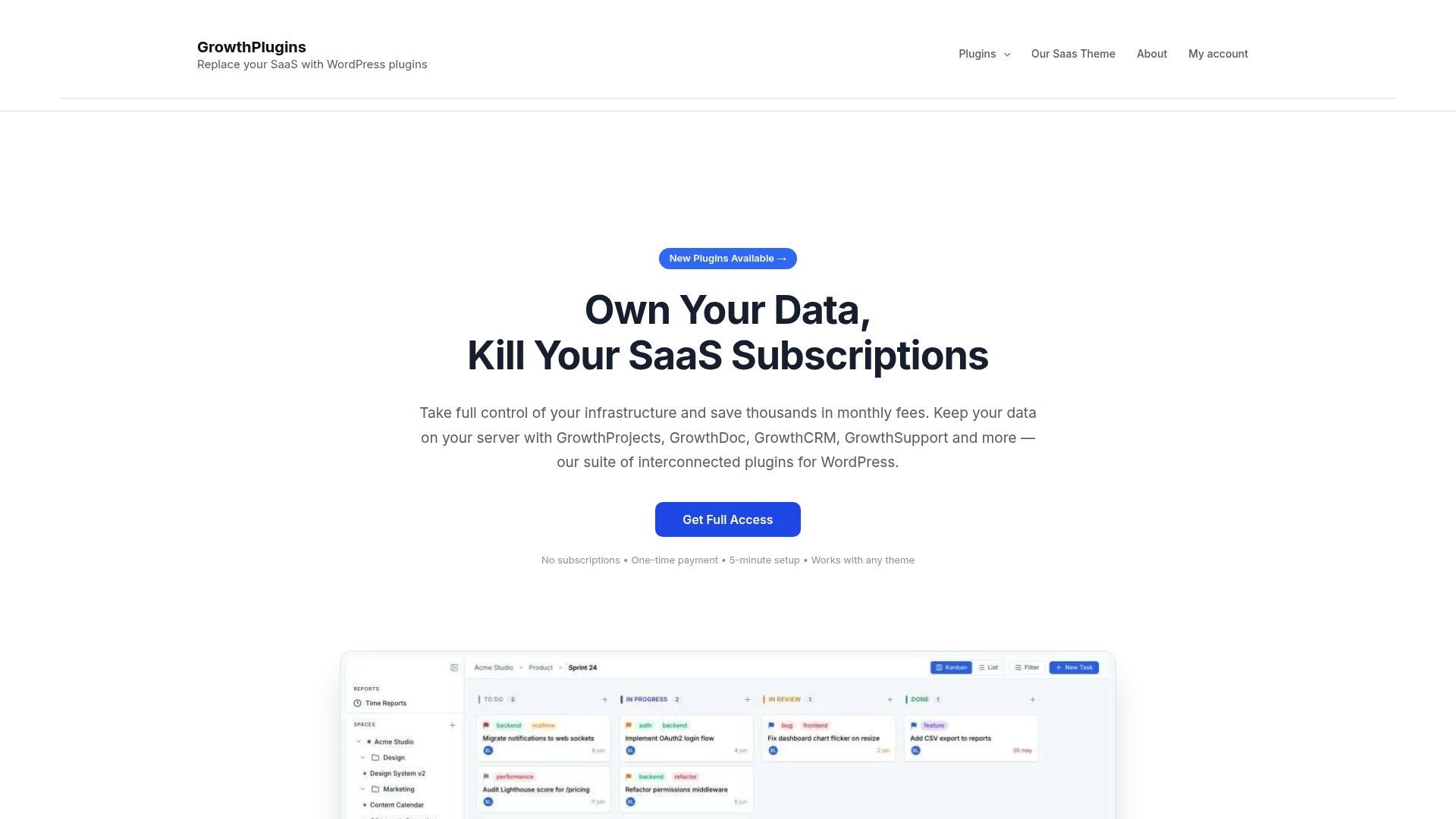
You get Kanban boards, list view, time tracking, task comments, workspaces and folders, a support ticket system, a client portal, and a knowledge base, all running inside your existing WordPress install. WordPress user and role integration means your clients and team members are already in the system. Setup takes under five minutes. The free core plugins cover the basics; one-time paid upgrades unlock the full feature set.
For a 10-person agency currently paying $1,920/year on Linear Plus, the math is straightforward. One-time plugin cost, full data ownership, and no vendor lock-in. Start with the GrowthProjects plugin to see how it maps to your current workflow.
Useful sources and vendor pages to read next
- Open Source Alternatives to Linear: Deep Dive for 2026 — OSSAlt Guides | OSSAlt
- 7 Best Linear Alternatives in 2026 (We Tested Them)
- Best Open-Source Linear Alternatives (2026) | OpenAlt
- Linear Alternatives for Small Dev Teams Who Like Clean Proj… (2026) | fromscratch
- Best Linear Alternatives for 2026 | Stellary
FAQ
What are the best free alternatives to Linear?
Plane (cloud tier), GitHub Projects, Asana (up to 15 users), Jira (up to 10 users), and ClickUp all offer free tiers. Plane’s self-hosted option is free with no seat limits.
Is there a self-hosted alternative to Linear?
Yes. Plane is the most mature open-source option and runs on a standard VPS with Docker Compose. Growthplugins is the recommended self-hosted choice for teams running WordPress.
Why do teams switch away from Linear?
Most teams leave because they’ve outgrown Linear’s fixed five-state workflow, hit the free plan’s issue caps, or need reporting and custom fields that Linear doesn’t support at their tier.
How is Linear different from Jira?
Linear is faster, more opinionated, and keyboard-first by design. Jira is more configurable and better suited to enterprise compliance workflows, but it requires significantly more admin overhead to maintain.
Can Growthplugins replace Linear for a WordPress agency?
For agencies managing client projects, invoicing, and support on WordPress, Growthplugins covers the core workflow: Kanban boards, time tracking, task comments, client portal, and knowledge base, all at a one-time cost with no per-seat fees.