New Plugins Available →
Own Your Data,
Kill Your SaaS Subscriptions
Take full control of your infrastructure and save thousands in monthly fees. Keep your data on your server with GrowthProjects, GrowthDoc, GrowthCRM, GrowthSupport and more — our suite of interconnected plugins for WordPress.
No subscriptions • One-time payment • 5-minute setup • Works with any theme
Trusted by agencies and teams running WordPress
WordPress 6.0+ • PHP 8.0+ • GPL-2.0 License • Compatible with any theme • Block & Classic editors
Your Team Deserves Better Than Scattered Tools and Monthly Bills
You already run your website on WordPress. Why pay $10–$30 per user per month for Asana, Monday, or ClickUp — and hand your project data to someone else’s servers? GrowthProjects replaces them with a single plugin. Self-hosted. Unlimited users. Free to start.
100% Self-Hosted
Your project data stays in your WordPress database. No third-party servers. Full GDPR compliance. You own everything.
Unlimited Users, 0€
Add every team member and client without watching your bill grow. No per-seat pricing on any plan — free or premium.
Native WordPress
Uses your existing users, roles, and permissions. Install the plugin, drop a shortcode, and your team is ready to go in 5 minutes.
The Full Suite
Everything you need to manage
your business operations in one place.
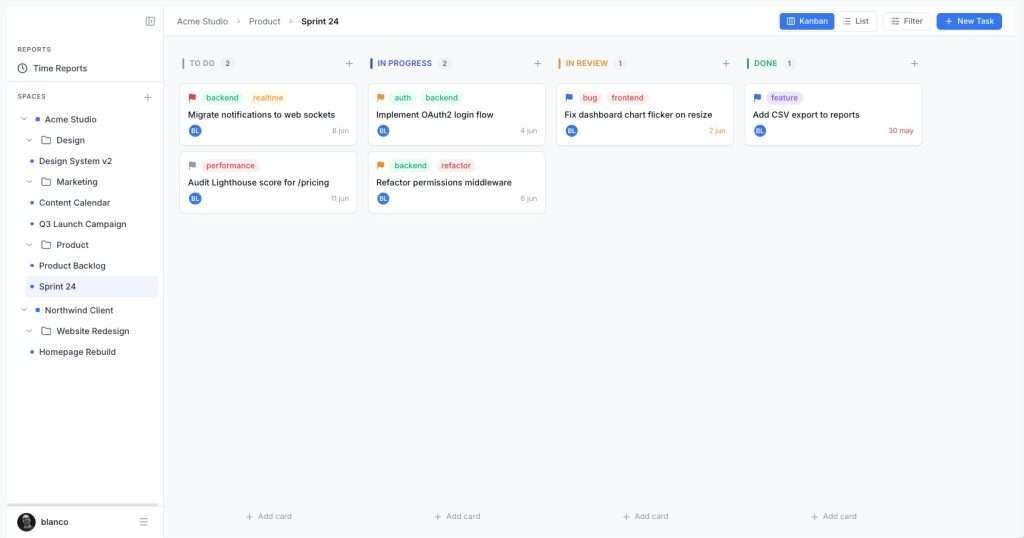
Kanban Boards
Drag-and-drop tasks between custom status columns. See priorities, assignees, and due dates at a glance.
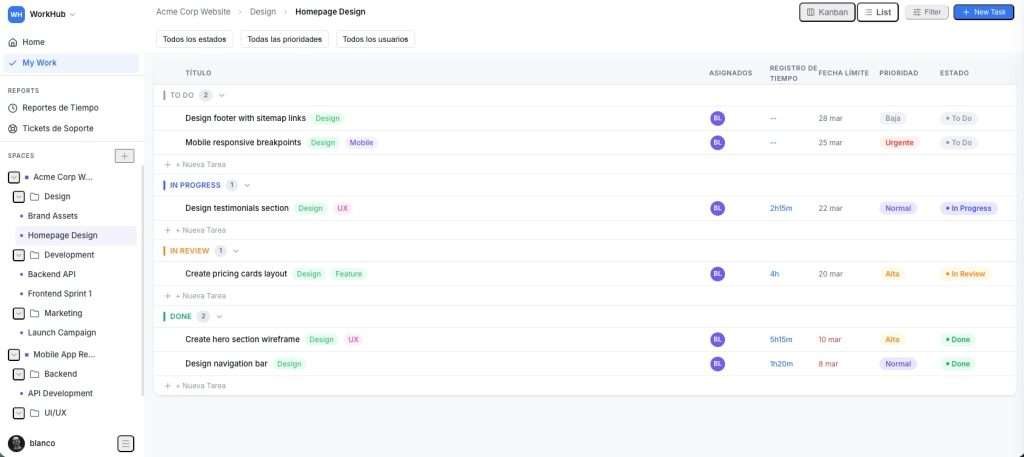
List View
Sortable table with filters for status, priority, assignee, and due date. Toggle views instantly.
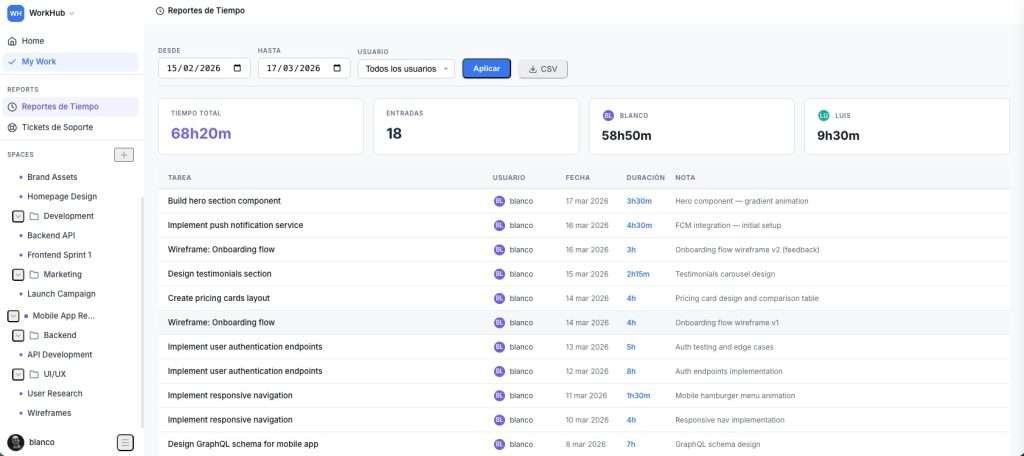
Time Tracking
One-click timer or manual entries. View per-user and per-task reports with date range filters.
Workspaces & Folders
Organize by client, department, or project. Unlimited depth with a collapsible sidebar tree.
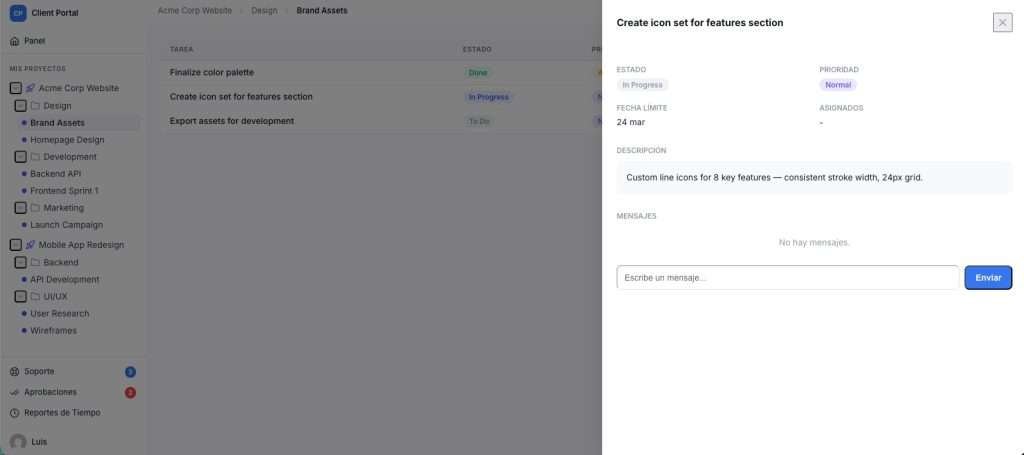
Task Detail Panel
Slide-in panel with descriptions, comments, assignees, tags, due dates, and time entries — no page reload.
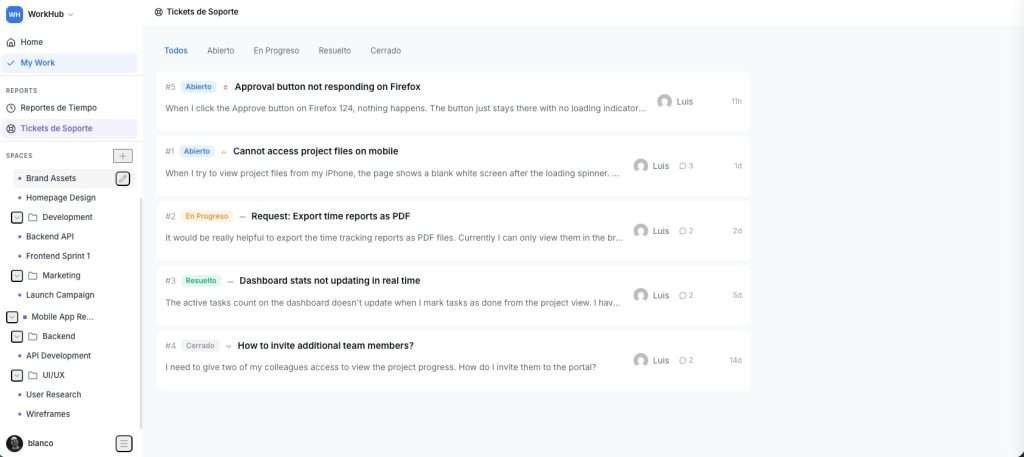
Support Tickets
Create, assign, and track support requests with status workflows and threaded replies. Built right into your project dashboard.
Client Portal
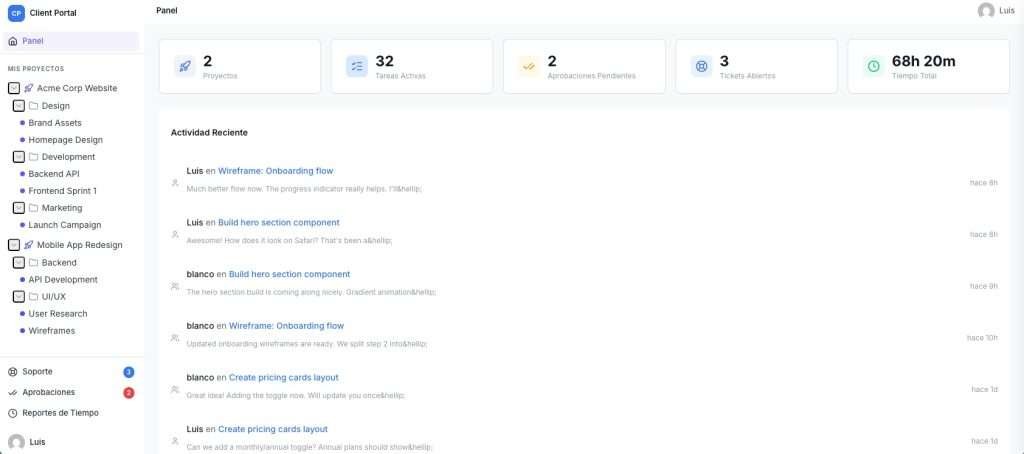
COMING SOON
A white-label portal where clients view projects, approve deliverables, send messages, and submit tickets — under your brand.
Up and Running in 3 Steps
1
Install the Plugin
Upload via Plugins → Add New or install from the WordPress directory. Activate — done.
2
Add the Shortcode
Create a page, paste [GrowthProjects]. Your full project management app loads on that page.
3
Start Building
Create a Workspace, add Folders and Lists, and start managing tasks. Invite your team through WordPress roles.
The Integration Advantage
Because all plugins share the same database, data flows seamlessly. Turn Support tickets into Projects instantly. Let Pulse alerts notify Support automatically. No Zapier required.
Meet the Suite
One Plugin per SaaS You Cancel
Every plugin is a one-time €19 payment with unlimited users. They share one database, so they work better together.
GrowthProjects
Project management with drag-and-drop Kanban boards, list view, time tracking and task comments. Replaces Asana, Trello or ClickUp.
GrowthDoc
A Notion-style knowledge base inside WordPress. Hierarchical, infinitely nestable docs for your team’s documentation.
GrowthCRM
A sales CRM with a visual Kanban pipeline. Capture leads and drag deals across configurable stages. Replaces Pipedrive.
GrowthSupport
A full help desk on your site: ticket management plus a self-service portal for your clients. Replaces Zendesk or Freshdesk.
GrowthInvoices
Invoices, quotes, clients and a product catalog — your whole billing workflow inside WordPress, no WooCommerce required.
GrowthPulse
Monitoring for every site you manage. One agency-wide dashboard to keep a finger on the pulse of all your client sites.
The True Cost of SaaS vs True Ownership
| Feature | Typical SaaS (ClickUp, Notion, Zendesk) | GrowthPlugins |
|---|---|---|
| Pricing Model | Monthly / Per User | One-time / Unlimited Users |
| Data Ownership | Stored on their servers | Stored on your server |
| Integration Latency | API Limits & Webhooks | Zero latency (Native WordPress) |
| Customization | Limited to UI settings | Full access to modify via hooks |
Built for How You Work
From solo freelancers to multi-client agencies, GrowthProjects scales with your workflow.
Freelancers
Track client projects and billable hours in one place. Log time, organize tasks, and keep everything on the same WordPress site you already manage.
Recommended: Free
Small Teams
Collaborate across Kanban boards, leave comments, and handle support requests — without adding another SaaS tool to your stack.
Recommended: GrowthProjects Pro — €19 one-time
WordPress Agencies
Manage multiple clients with separate workspaces. Give each client a branded portal for approvals, messaging, and project transparency. Replace Basecamp and client portals.
Recommended: Full Access — €99 one-time, all plugins
Frequently Asked Questions
What is GrowthProjects?
GrowthProjects is a WordPress plugin that adds project management, time tracking, support tickets, and a client portal to your website. It’s self-hosted — all data stays in your WordPress database. The free version includes Kanban boards, list view, task management, comments, and time tracking. GrowthProjects Pro (€19, one-time payment) adds support tickets, and a branded client portal is coming soon.
Is GrowthProjects really free?
Yes. The free version is fully functional with no user limits, no time restrictions, and no feature walls on core functionality. Kanban boards, list view, task management, comments, time tracking, and time reports are all included at no cost. You only pay if you want premium features like support tickets — GrowthProjects Pro is a one-time €19 payment, with no subscription.
How does GrowthProjects compare to ClickUp, Asana, or Monday?
GrowthProjects offers similar core features — Kanban boards, list view, task management, comments, and time tracking — but it runs on your own WordPress server instead of a third-party SaaS. There’s no per-user pricing, your data stays private, and it integrates natively with WordPress users and roles. The biggest trade-off is that advanced features like Gantt charts and automations are not yet available.
Does GrowthProjects work with my WordPress theme?
Yes. GrowthProjects renders inside a shortcode using its own scoped CSS and design system. It’s compatible with classic themes, block themes (Twenty Twenty-Five, Astra, GeneratePress, etc.), and page builders like Elementor and Beaver Builder. It won’t conflict with your theme’s styles.
How many users can I add?
Unlimited. GrowthProjects uses your existing WordPress users. There’s no per-seat pricing on any plan — free, Pro, or Business. Administrators, Editors, and Authors get access automatically.
Where is my data stored?
All data is stored in your WordPress database on your own server. GrowthProjects is 100% self-hosted. Nothing is sent to external services. You have full ownership and control, which makes it inherently GDPR-compliant for data residency.
What does the client portal include?
The client portal (coming soon) is a separate, white-label front-end where clients can view assigned projects, track task progress, approve or reject deliverables, send messages to your team, submit support tickets, and view time reports. It uses a separate shortcode ([GrowthProjects_portal]) and can be fully branded with your logo and colors. It will be included in GrowthProjects Pro at no extra cost.
Can I use GrowthProjects on client sites I build?
Yes. The free version is GPL-licensed and can be installed on unlimited sites. Premium licenses are per-site — a one-time €19 payment per site, with no renewals.
Your Projects Belong on Your Server
Install GrowthProjects in under 5 minutes. Manage projects, track time, and collaborate with your team — all from the WordPress dashboard you already know.
Free forever • No credit card required • Unlimited users • 7-day money-back on premium